Sync with Outlook
This optional add-on to Remind-Me
can be used to synchronize your Remind-Me and
Outlook calendars. Outlook 2000 or later is
required (32 bit versions only). The following download includes
Remind-Me and the Outlook Conduit, bundled
together.
| Download Remind-Me with Outlook Conduit
For Outlook 2000, 2002(XP), 2003, 2007,
2010, 2013, 2016, or 365 (32-bit) |
 |
Version 11.1 (Sync Module 22)
Released February 28, 2026 |
All synchronizations are initiated from within Outlook.
Outlook 2010 and later:
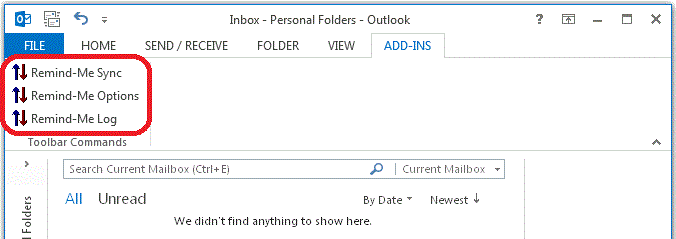
After installing the Outlook conduit you will have three new Remind-Me
buttons under the "ADD-INS" tab in Outlook as shown circled in red:
Outlook 2007 and Earlier:
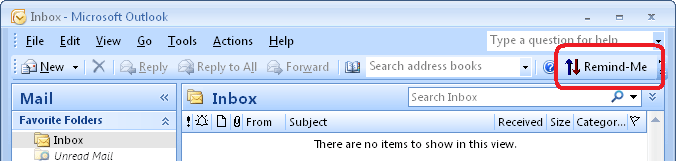
After installing the Outlook conduit you will have a new "Remind-Me"
button on the Standard toolbar in Outlook as shown circled in red:
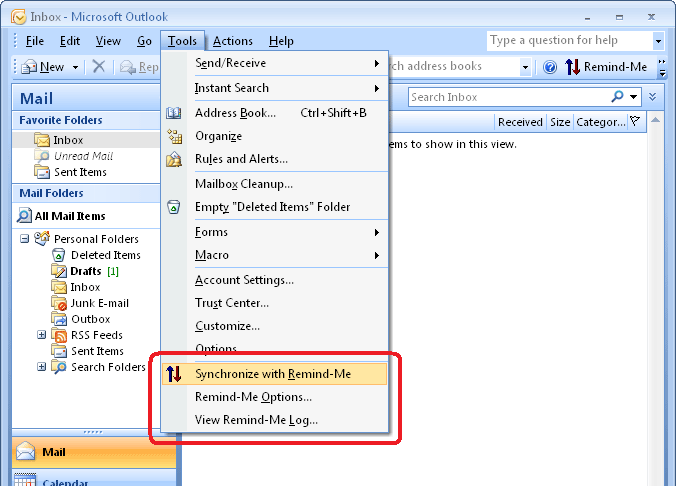
and under the "Tools" menu will be three new menu choices:
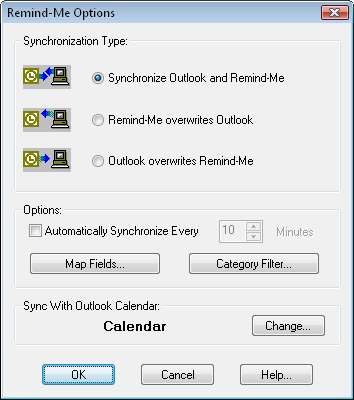
To specify the type of synchronization select "Remind-Me Options..." from within Outlook.
You will be presented with this dialog box:
To initiate the selected synchronization, either click on the
Remind-Me Sync button on the toolbar, or use "Tools/Synchronize
with Remind-Me".
Synchronize Outlook and Remind-Me:
Keeps Remind-Me and Outlook synchronized.
This is a 2 way synchronization. You can
make edits on either calendar. When you
synchronize all edits from both calendars will be
updated to both Outlook and Remind-Me.
Remind-Me overwrites Outlook:
When you perform this type of synchronization
your Outlook calendar will be updated with the
events from your Remind-Me calendar. This
is a 1 way synchronization. Any events that
you had on your Outlook calendar will be removed.
Outlook overwrites Remind-Me:
When you perform this type of synchronization
your Remind-Me calendar will be updated with the
events from your Outlook calendar. This is
a 1 way synchronization. Any events that
you had on your Remind-Me calendar will be
removed.
See Also:
Sync with Google
|